What are they
Arrays & ArrayLists are both containers that hold multiple items usually of a similar type. They are what is termed Data Structures.
- both store data
- data held is called an element
- both can store any number of elements
- elements are held in numerically ordered indexes
- both can be traversed in a loop, one element after the other
- you can access these elements directly via their numeric index
What can be done
There are a number of operations that be performed on both arrays & ArrayLists.
- add elements
- remove elements
- search for an element
- sort the elements
- add an element at a specific index
- count the number of elements
- change the value of a stored element
When to use them
Use them if your program needs to hold a collection of similar items in one place. Here's a basic difference between them:
- An array
- use an array if you know the size of the container won't change during runtime
- An ArrayList,
- use an ArrayList if the number of items stored is going to be dynamic throughout the runtime of the program and you don't know the upper limit
Arrays
ArrayLists
Examples
Overview
Features of an array:
- you must set the array size when you instantiate it, and it can't be resized. This is termed 'static'
- an array is an object but it has no methods - in this it's a little different from other objects
- an array has one instance variable - length - that you can directly access
- it can hold primitive data or objects
- all elements of any one array must be of the same data type
Declaration
- When declarating an array you must give it the same data type as the elements you intend to store in it
- Because it's an object you should use the
new operator
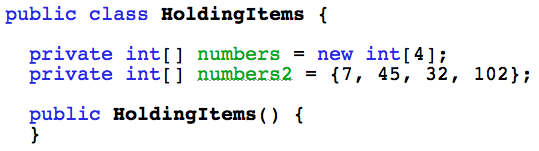
- There is also a short-cut way to declare and add elements all in one line (similar to the String class)
Holding primitives
When created, an array is immediately initialized with the default value of the declared type (eg int, boolean, double etc)
- for numeric the default value is zero
- for boolean it's false
- for char it is zero
- both the below arrays as yet only hold zeroes - until other values are added

Holding objects
Here also, an array is initialized with the default value of the declared type, in this case an object type.
- The default value of any object reference type is null
- This means that there's no actual object referenced
- The next step is to create an object and use the array index as the object reference
- The array never actually holds the object - it holds the reference to the object
See an example ...
Holding objects
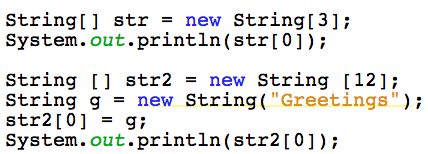
Here two arrays hold String references:
- Array
str - it's print statement would print null because it's references are null
- Array
str2 - would print the String object's value (Greetings) because a String object has been created and the array index is used to access it's object reference variable
 Back
Back
Array access
The key to accessing an element in an array is to use the array indexes.
- indexes are numeric
- The first index is zero
- The last index is always the length of the array minus 1
- When you create an array you must give it a size (length)
- if length is 4, indexes are 0 - 3
- if length is 12, indexes are 0 - 11
See an example ...
Array access
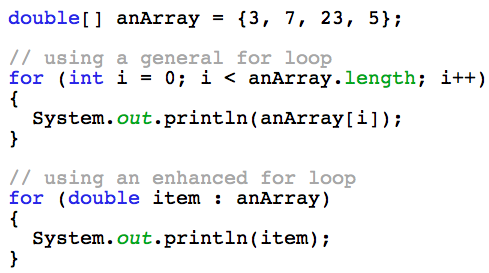
To access an array you must either know exactly which index your value or object reference is located at, or you must loop through the array until you find it.
Here's an example of looping through an array of double values.
 Back
Back
Array examples
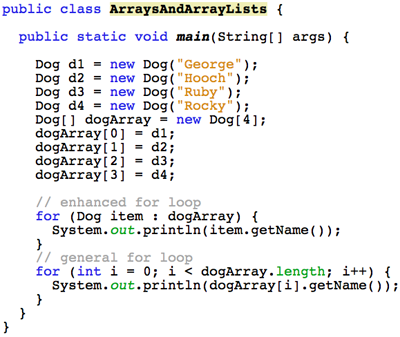
Here, an array (dogArray) holds a group of Dog objects.
See how to add, print in a loop and remove a Dog from the array.
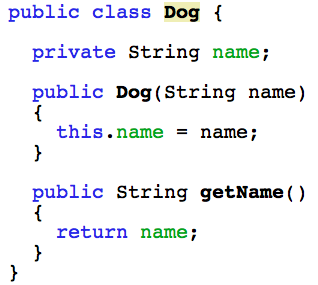
The Dog class
The Dog class - the class is designed so that when you create a Dog object you must give it a name.
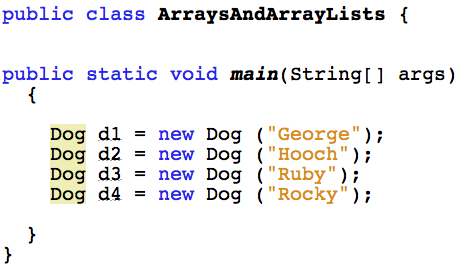
The Dog objects
The objects are created outside the Dog class, in the Main class, using the new operator.
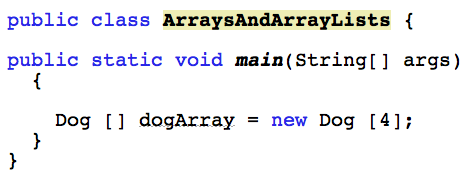
The array
The array must be of the same data type as the objects that you intend to hold in it.
So this array is of type Dog. At the moment it only holds null object reference variables.
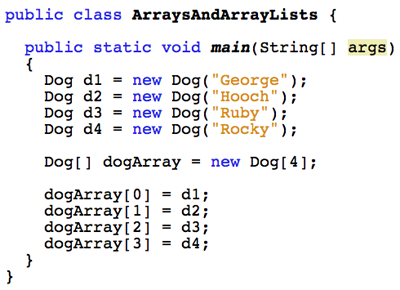
Adding Dogs
The Dog objects and the array already exist, & each index of the array now references a Dog object.
Print the array
The array can be walked through using either a general or an enhanced for loop.
Remove a Dog
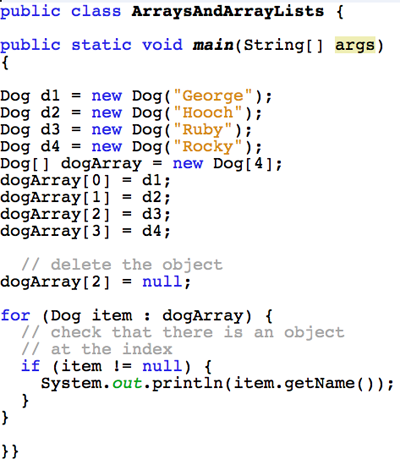 See an explanation ...
Remove a Dog
You can't actually remove an element from an array.
- Once the size is set, that's final
- You can copy all elements, except the ones you want removed, to another smaller array
- For an array of objects, you can delete the object by setting it to null, but remember that the object reference variable remains in the array
- For an array of primitives, it's best to just copy all wanted elements to a new array
Overview
Features of an ArrayList:
- It's a class in the Java library
- Only objects can be added to an ArrayList
- It's default size is empty - no elements
- It will grow in size as you add new elements
- It will also shrink in size when you remove elements
- Because of this ability to change size, ArrayLists are called 'dynamic'
Declaration
Since an ArrayList is an object you must use the 'new' operator to create an object of it before you can use it.
- Sometimes the declaration and instantiation are in separate parts of a class:
- declare the ArrayList at class level with instance variables
- then create the ArrayList object inside a method
- Or you can put declaration and object creation together
See examples...
Declaration
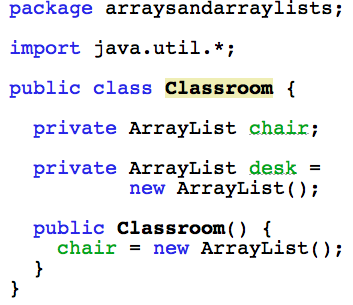
The ArrayList named desk is declared and instantiated on the same line, but chair is instantiated inside the constructor.
Holding primitives
ArrayLists only hold objects. So how can you hold primitive data in one?
- The answer is Autoboxing:
- it looks like you're adding just an int, or double etc to the ArrayList
- but the primitive data is wrapped in a corresponding object type
- when you get the value from the ArrayList it's unwrapped from it's object and you get just the primitive again
- and you don't do anything extra
See an example...
Holding primitives
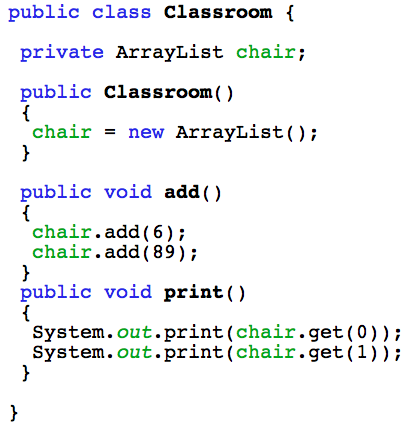
The primitive type int is wrapped in an Integer object when added to the ArrayList and unwrapped when gotten from the ArrayList - all unseen.
Holding objects
An ArrayList holds actual objects and you use the indexes of the ArrayList to access any object in it. It can hold them in two ways:
- hold all objects as type Object
- one ArrayList can hold lots of different object types
- eg, Dog & String & another Dog
- or hold objects of one specific type
- it will hold only the object type you specify
- eg, Dog & Dog & Dog & Dog
As type Object
An ArrayList can hold all objects as type Object. But you'll have to cast them back to the correct object type to access them again:
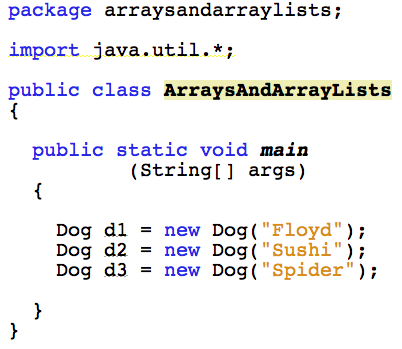
The objects
We have 3 objects of type Dog. Notice also - import java.util.*;
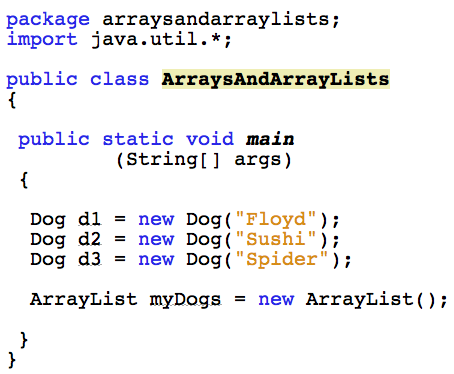
The ArrayList
The ArrayList is a class, so use the new operator to create an object of it. Its reference is called myDogs.
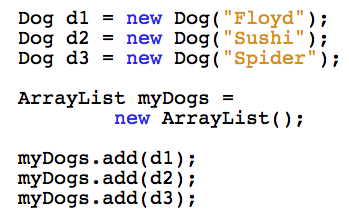
Adding the objects
The ArrayList class has a method called add.
- Call this method using
myDogs, the ArrayList's reference
- Pass in the reference to the Dog object through the add method's parameter list (eg
d1, d2, d3)
Accessing objects
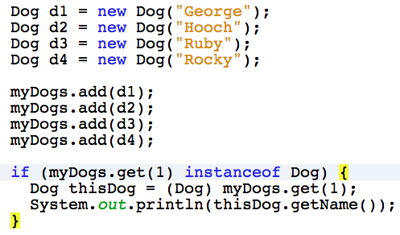
The ArrayList class also has a method called get for accessing any object in the class. Because all elements are only held as type Object you'll need to 'cast' the element to the correct data type.
In this case, its a Dog object.
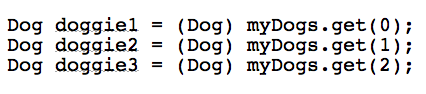
Casting
Casting means converting the object to it's proper type. Remember that it's held in the ArrayList as type Object, but we want a Dog. So to cast it back to a Dog object means to convert it back to that data type.
But, you need a way to check the object data type because:
- if you cast without checking you may get an exception -
- that means your program could crash
- or do something unexpected
- either way, things won't be good - unless you use
instanceof
instanceof
instanceof is an operator that you can use to check whether or not an object is a certain type. It can check that the object is an instance of any class that you choose.
As specific object
You can enforce a single object type on an ArrayList using Generics:
Why enforce it
- It can be a safety net. You know exactly what type of object is in the collection:
- You know that if you have a collection of Dogs you won't find any Fish or Strings or URLConnections in the group
- It also guards against unseen compilation errors:
- Problems are morely likely caught at compile-time than at run-time
- Mostly, you don't need to cast when accessing any items - they can only be of one object type
Generics
- Generics is the enforcing of a specific data type, generally over a collection
- eg, an ArrayList
- It's commonly called making the collection 'type safe'
- When declaring the collection you state the object type between angle brackets < >
- An example:
ArrayList<Dog> myDogs = new ArrayList<Dog>();
Declaration
- Anytime you see the angle brackets in Java, you're working with Generics < >
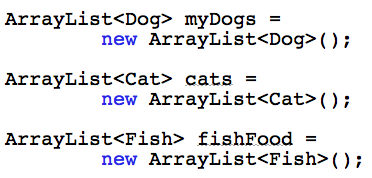
- Both sides of the equals sign must include the Object type in angle brackets
- Some declaration examples:
Adding objects
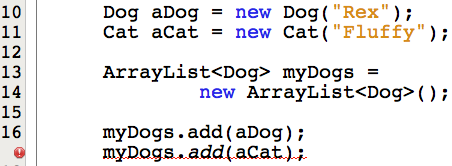
- If you have the right type of object you can add it
- If not, your program won't compile
Object access
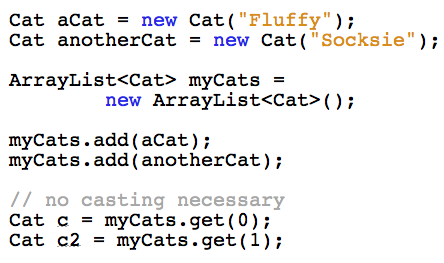
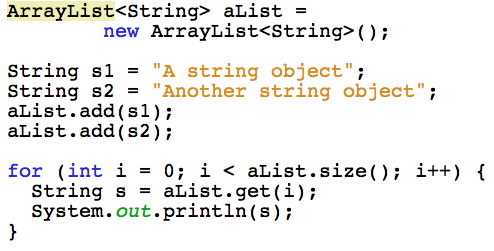
- To access the elements of the list, just use the index:
- Mostly, there is no casting necessary because you've only let a specific object type in
Accessing objects
- To access objects you use the ArrayList index
- Here the ArrayList is accessed in a loop
Still cast ???
There is a situation where you will need to cast even using Generics. It's when you combine it with inheritance.
- Declare the ArrayList type as the Super class
- It can hold objects of the Super class or any its Sub classes
- To access an object, use
instanceof to find which class it is, and cast to that class
- See the classes
- See an example...
Still cast ???
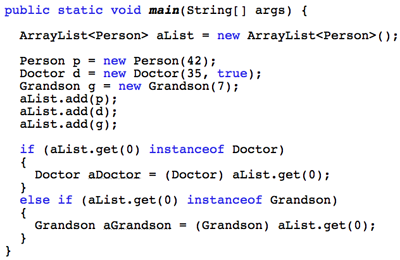
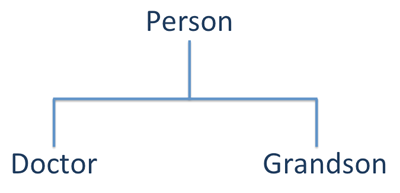
This example uses 3 classes -
- Person is the Super or Parent class
- Doctor & Grandson are Sub classes of Person
- Both these Sub classes can be held in an ArrayList of type person
- They are both of type Person through inheritance
- They are just more specific
Still cast ???
Use instanceof to check you have the right object - then cast.