What is control flow
Statements execute top to bottom, line following line. Control flow statements interrupt this normal code execution.
When you need to make a decision, repeat statements, or branch elsewhere, you use Java's control structures.
- If or Switch statements - the outcome of a condition determines which branch to take
- Looping - repeat the same statements
- Break, continue or return statements - program must branch immediately
How it's done
Choice statements
- if-then
- if-then-else
- switch
Repetitive loops
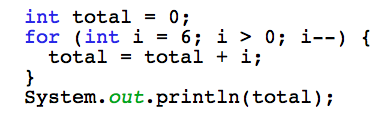
- for
- while
- do while
- Branching
- break
- continue
- return
Using booleans
- Choice and looping statements make use of
booleans.
- A boolean condition is used and if this condition evaluates to
true the statements inside the block are executed.
- If the condition evaluates to
false, the statements are skipped.
- The code outside the control statements is executed line by line regardless.
An example ...
Using booleans
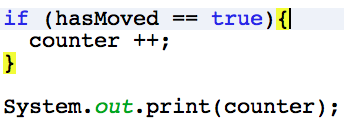
hasMoved is a boolean variable
- If
hasMoved is true then counter will be incremented.
- If
hasMoved is false the code within the highlighted brackets will not execute.
- the print statement will always execute.
Choice
If & Switch
There are two mechanisms for making choices in Java -
ifswitch- Both use the comparison of values to determine whether or not to execute statements inside their blocks
- If the comparison returns true then the statements are executed
- Otherwise, the statements are ignored
If
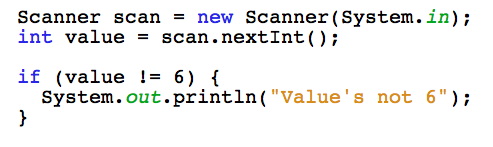
- It can be very simple and only execute statements if one boolean condition is met.
- Or it can include an alternative path when
else is also used
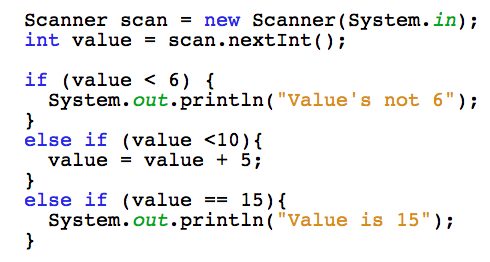
- Can use multiple
else if statements in conjunction with the if statement
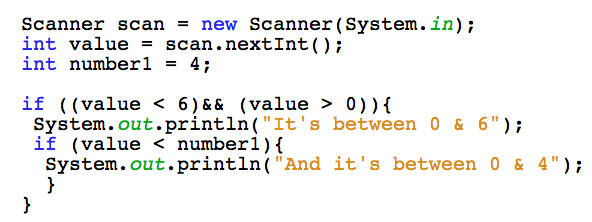
If statements can be nested inside each other
Unpack it ...
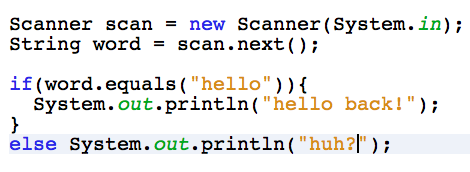
If
- The keyword
if
- Boolean condition - inside the parentheses ( )
- Curly braces { }
- Code to potentially execute - inside the curly braces
- Optional
else
Switch
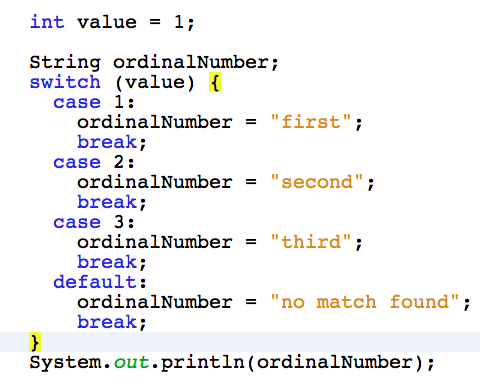
- There's always a value outside the switch that is being compared
- Comparison is done in order - if checking for > 90 and > 80, do > 90 first
- Each case should have a
break statement to close that case before another starts
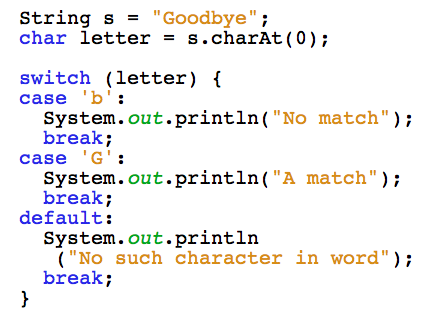
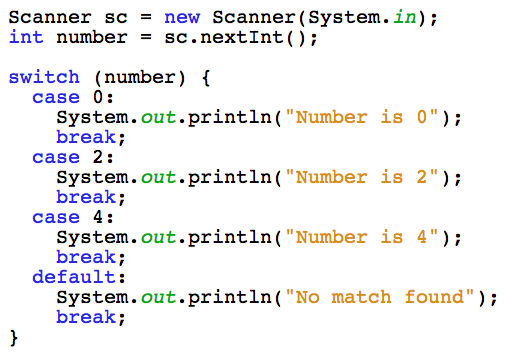
- A default case handles values that the cases don't get a match for
The syntax ...
Switch
- The keyword
switch followed by the boolean condition inside parentheses ( )
- The rest should all be inside curly braces { }
case comparion value:- Statement to be executed if this case is true
break;- Lastly
default: (this is for when there's no match)
See an example ...
Switch
Which one ...
Use what you are comfortable with but as you progress in Java keep in mind the following-
- The
if statement can become harder to follow if nested too many times
- In JDK1.6 the
switch works only with byte, short, char and int
- But install JDK7 and you can use the
switch on Strings, enum types and some Wrapper classes also
- When working with very large or complex data the
switch is said to be faster
Examples
Simple if
If else
Nested if
See switch ...
Switch
Switch using char
Switch using int
Looping
What are loops
Loops are used when you wish to repeat lines of code, eg:
- Adding together a list of numbers
- Reading in the contents of a file
- Searching for a word in a paragraph of text
- Loops generally work with a pre-defined condition. While this condition is met, the loop continues executing.
- The condition is a boolean expression eg:
i < 10ticked == false
for loops
There are two forms of for loops
- General - can be used when you have any type of code to repeat
- Enhanced - used to iterate through a Collection or array
- The difference in their structure lies inside the parentheses ( ) General
for loop ... Enchanced for loop ...
General for
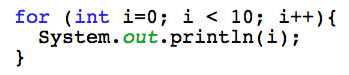
- The keyword
for
- Loop conditions - inside the parentheses ( )
- Initialization value
- Termination expression
- Increment expression
- Curly braces { }
- Code to execute - inside the curly braces { }
Enhanced for
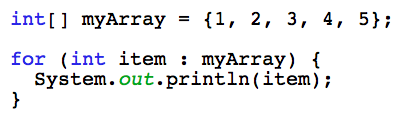
Used for iterating through Collections or arrays.
- The Collection or array type
- an iteration variable (your choice)
- semi-colon :
- The Collection or array name
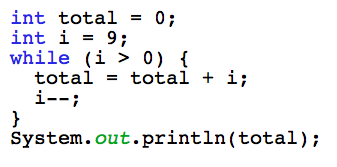
While
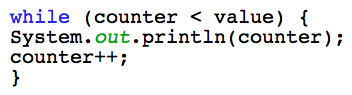
- The keyword
while
- Boolean condition - inside the parentheses ( )
- Inside the curly braces { } :
- Statements to be executed if the condition evaluates to
true
- AND LAST, a statement that changes the condition (without this the loop would never stop)
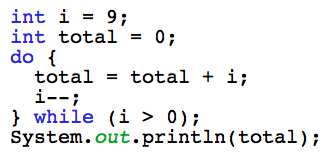
Do while
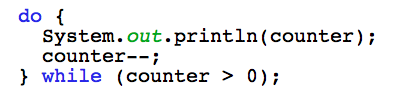
- The boolean condition is evaluated at the end of the loop
- Therefore the very first time the loop is entered, the statements will execute regardless of the condition
- After this first time, the loop is only entered again if the condition evaluates to
true
- The statement must include an exit condition
Which one to use
- The
for loop is used when you know beforehand how many times you wish to go through the loop
- The
while loop is for when you don't know beforehand how many times to continue looping, or whether the loop should even execute at all
- The
do while loop is used when you always want to execute the statements inside the loop at least once, but don't know if they should be executed any more times after that
Examples
For
While
Do while
Branching
What is branching
- Branching is when the road suddenly veers off to the left and there's nowhere else to go
- In programming, it means to suddenly re-route the flow of execution from one point to another
- The 3 mechanisms used for branching are:
breakcontinuereturn
Break
Break statements terminate a loop. The 2 types are:
- unlabelled - terminates the inner-most control statement it is located in ( eg
switch, for, while, do while)
- labelled - terminates a labelled statement
Unlabelled break... Labelled break ...
Unlabelled break
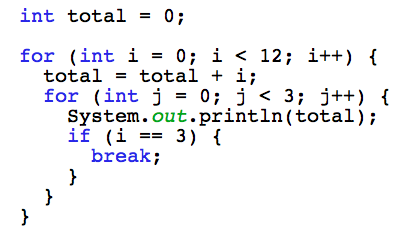
- The inner
for loop exits prematurely when i equals 3
- For every other value of
i the inner loop executes normally
- The outer loop is unaffected
Labelled break
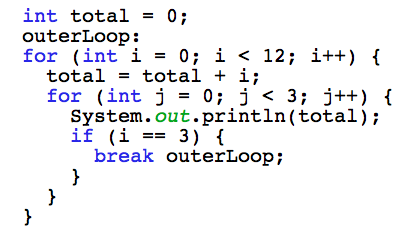
- The outer
for loop exits prematurely when i equals 3
- When this happens the inner loop automatically stops also
Continue
If you wish to continue running a loop but stop processing the remainder of the code in the loop body, use continue. The 2 types are:
- unlabelled - discontinues the current iteration of the control and enters the next one
- labelled - terminates a labelled statement
Unlabelled continue... Labelled continue ...
Unlabelled continue
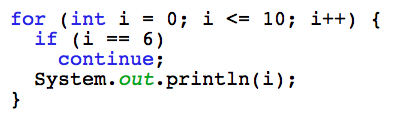
- The loop will print the value of
i for every value except 6
- When
i equals 6 any code after the continue statement will not be executed
Labelled continue
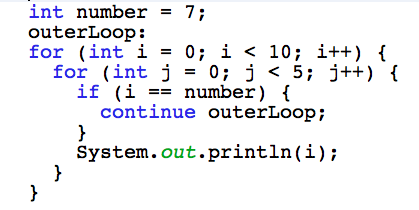
- Both
for loops continue to execute but the inner doesn't print anything when i equals 4
Return
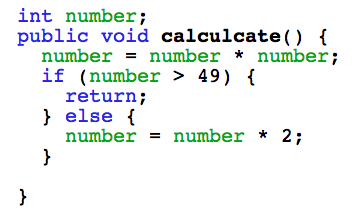
The return statement exits from a method and returns execution to where the method was called from. It has 2 forms:
- The first returns a value to the program
- The second doesn't - it just causes the method to exit
Examples...
Return
Returning a value to the program: 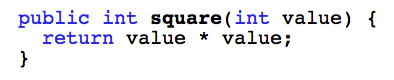
Just exiting the method:
Which to use
Break -
- Use this when you need to terminate an entire loop
Continue -
- Use this to break out of a loop's iteration early
Return -
- Used to break out of a method or return a value to the program