Learn Java
Inheritance
Classes can inherit commonly used state and behaviour from other classes.
- Object is Java's top level class and all classes extend or inherit from this class
- The linking of the classes is called a hierarchy, like an HTML document tree
- No Java class is separate from this hierarchy
- The connections...
- What's inherited...
Inheritance
- A class above another in the inheritance tree is called a super, base or parent class and any classes below it are called sub, derived or child classes
- All classes are sub classes of the Object class and extend this class either directly or indirectly
- Not all classes have sub classes below them
- A class can only extend one super class
Inheritance
Not everything in a class is inherited by it's sub classes.
These are inherited:
- public fields (instance & class variables)
- public methods
- inner classes
These aren't:
- constructors
- private fields
- private methods
Why use it
- Inheritance allows you to define a general class, and then later define a more specialized class adding to it new details that the older more general class definition lacks.
- It enforces a protocol or structure on a group of similar classes
- It reduces the amount of code written - you reuse software already written
- Debugging code is easier because of it
- It uses polymorphism
Example
Here's a class FurniturePiece and two of it's sub classes, CoffeeTable & Chair.
They are both still FurniturePieces but more specific types of this class.
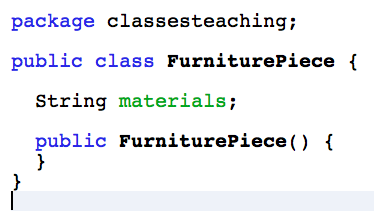
The super class
A general FurniturePiece class. It has an instance variable materials because all FurniturePieces will contain this data.
A sub class
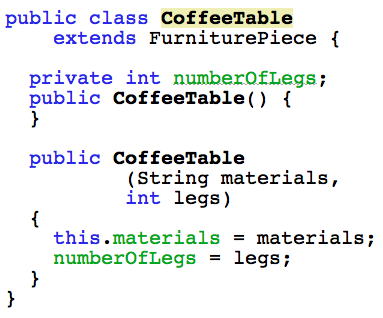
The CoffeeTable class. It extends the FurniturePiece class and is a more specific type of FurniturePiece.
A sub class
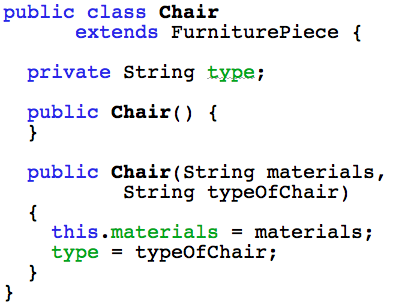
The Chair class. It also extends the FurniturePiece class and is a more specific type of FurniturePiece.
Together
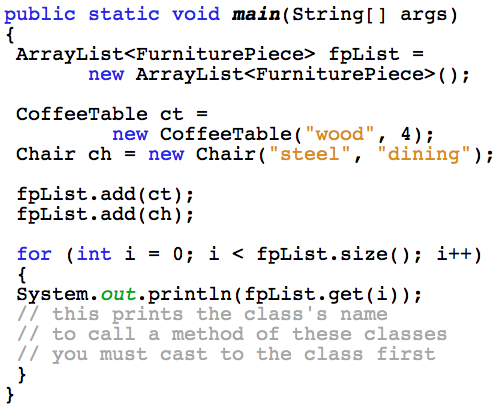
An ArrayList of type FurniturePiece can hold objects of type CoffeeTable and Chair - all together:
When to use it
What if you have a number of classes that are the same type of entity (a person maybe or a watch or aircraft) and:
- Some of their instance variables & methods would be the same
- Some of them would be different
- And, you don't want to rewrite many of the same methods and variables in all the classes
- Essentially the classes are the same, but are different enough for each to be it's own class
When to use it
You could end up with the following classes with a lot in common but also some individual traits and behaviours:
- Doctor
- Teacher
- Grandson
- Defendant
They are all people, but with some differences.
This is when you use inheritance.
But one important thing ...Is-A
For inheritance to work the relationship between any sub classes and their super classes is this:
- Each sub class must be the same type of entity as it's super class
- The relationship is called IS-A
- A Grandson IS-A Person
- A Doctor IS-A Person
- A Defendant IS-A Person
If this relationship isn't there, then don't use inheritance.
The answer might be to use an Interface.
How to use it
Start with a base class and then extend it with another; a sub class:
- The base class needs nothing special added to it
- Put all common instance variables and methods in the base class
- The sub class uses the keyword
extendsin the class declaration - In the sub class override any base class methods that need customizing
- Also in the sub classes add any instance variables and methods unique to that class
Examples
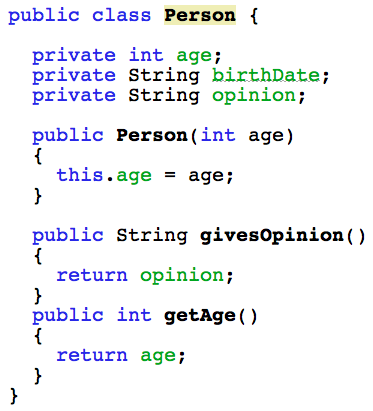
Person
The general Person class, with methods that would be common to a person.
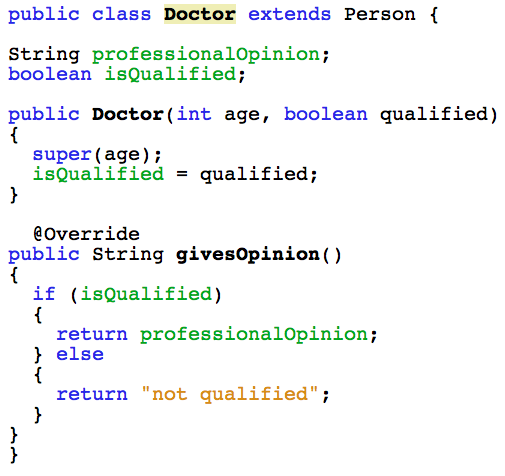
Doctor
The Doctor class - it extends Person and overrides the givesOpinion method.
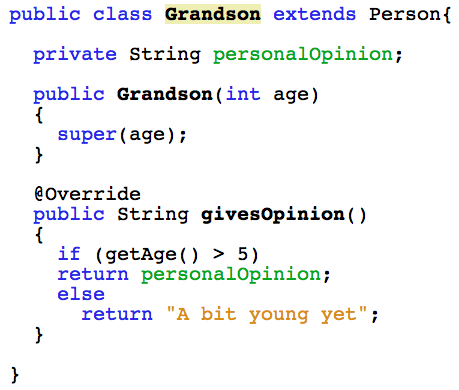
Grandson
The Grandson class - it extends Person and overrides the givesOpinion method.
Important
To use inheritance there must be an IS-A relationship between the super and sub class.
- Doctor IS-A Person
- Grandson IS-A Person
- Doctor & Grandson classes have no connection with each other
- The super class (Person) doesn't know if any sub classes (Doctor & Grandson) exist
- The sub classes (Doctor & Grandson) know about their super class (Person), and make use of its data & methods
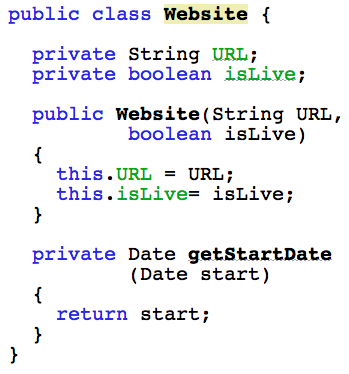
Website
The general Website class, with a method that is common to any Website.
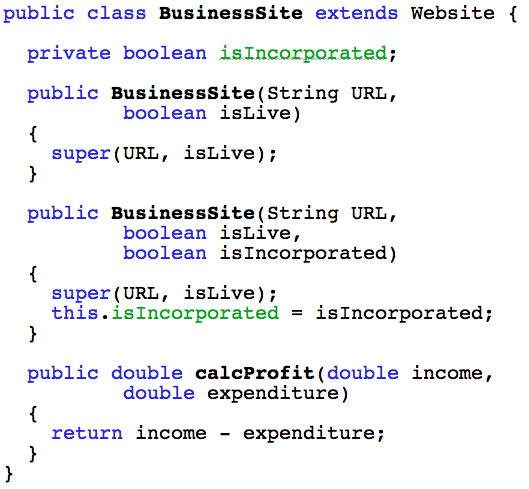
Business site
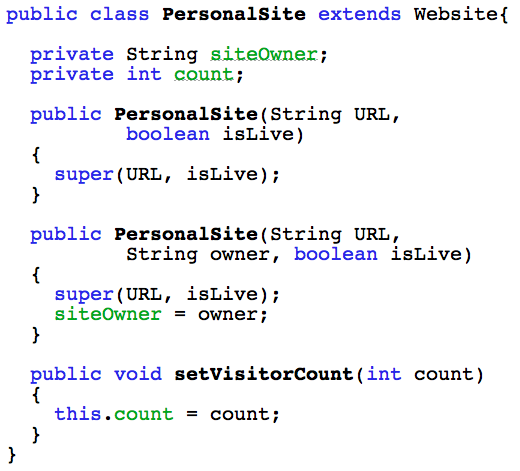
Personal site
Important
Just like the Person example the relationship from sub to super class must be IS-A .
- BusinessSite IS-A Website
- PersonalSite IS-A Website
- BusinessSite & PersonalSite classes have no connection with each other
- The super class (Website) doesn't know if any sub classes (BusinessSite & PersonalSite) exist
- The sub classes (BusinessSite & PersonalSite) know about their super class (Website), and make use of its data & methods
Keyword super
You can make use of the super class's constructor in a sub class too, through use of the keyword super
- You can call the super class's constructor inside the sub class's constructor
- But the call must be on the first line inside the constructor
- Don't use dot notation
- Use either of the following:
super();super(parameter list);- All the previous examples use this
Abstract classes
INTRO PARAGRAPH
Interfaces
Interfaces
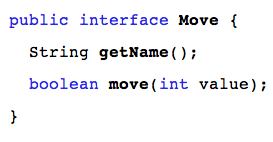
An interface is a group of related methods that have no body.
- The interface may only contain method signatures and the declaration of constants (using both
static&finalmodifiers) - It formalises the behaviour of any class that implements the interface
- Any such class must implement (add the body of) the methods defined by the interface
- Unless a class implementing an interface fulfills this method implemenation, it will not compile
When to use it
Because Java doesn't support multiple inheritance, any single class can have only one parent class.
- Using an interface can enable a class to conform to more than one structure (it's parent class & an interface)
- It also can provide a common structure for classes that can't be connected through inheritance:
- Inheritance requires each sub class to have a IS-A relationship with its parent class
- An interface can be implemented by a group of seemingly unrelated classes
Interface defined
- An interface is a file, similar to a Java class file
- Right click on the inner project folder and choose New... Java Interface
- Give your interface a relevant name and add any constants & method declarations
- Remember - all methods of an interface are implicitly public and abstract (not defined)
- Then its ready to use
- An interface defined...
Interface defined
Syntax is similar to a class except:
- Any class level variables must be defined as
static&final - Methods are only declared, not implemented
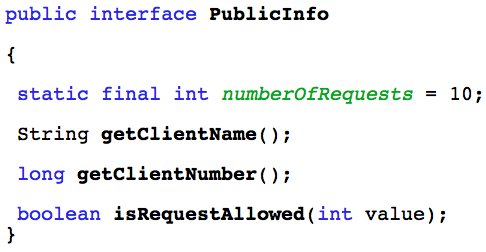
The Interface
- The methods of an interface have no body
- They just define a structure that implementing classes must comply to
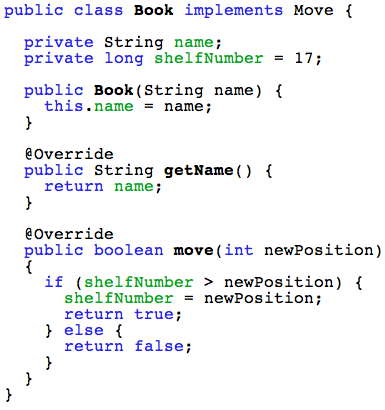
- Each class then customizes the methods as needed
- Move interface
- Book class
- Insect class
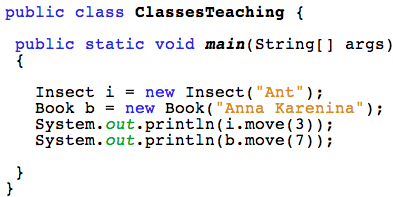
- Main class
Book
Insect
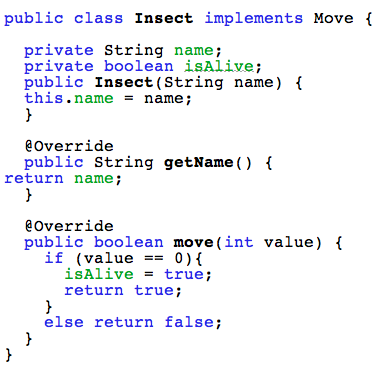
Move Interface
- The interface holds any constants and/or method declarations that the implementing classes must build
Main class
- Objects are created of the classes, not the interface
- Their methods are called in a normal way
Polymorphism
- This means being able to assign a different meaning to something across contexts
- Variables, methods and objects can have more than one form
It is used with inheritance
- an object reference variable can be of type super class
- But the methods called by this variable are re-defined (or overridden) in a sub class
- this is referred to as virtual method invocation
- See an example
Polymorphism
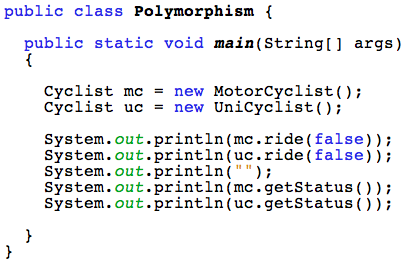
- In this example, the variable type is the super class
Cyclist - But when methods are called they are called from the sub classes,
MotorCyclist&UniCyclist - Cyclist class
- UniCyclist class
- MotorCyclist class
- The Main class
- When to use this
Cyclist class
This is the super class:
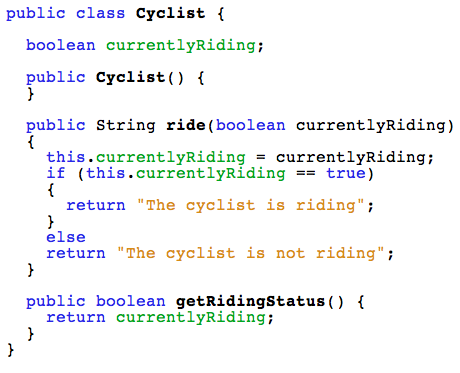
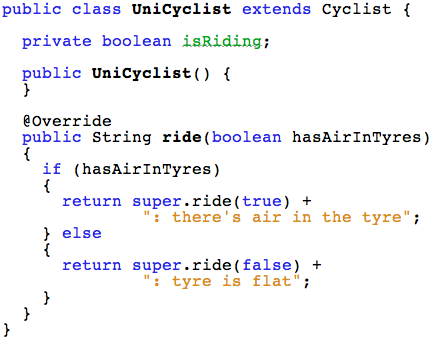
UniCyclist class
Notice the call to the super class's ride method using super.ride
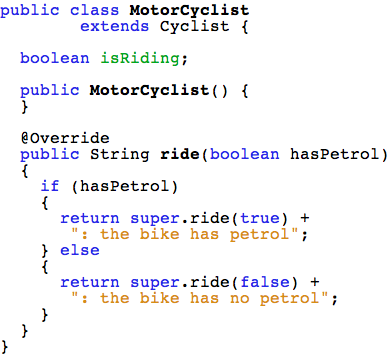
MotorCyclist class
This sub class also uses the super class's ride method even while it overrides it.
The Main class
Using the super class type to create objects of sub classes:
When to use this
- An example: A single list using generics
- Eg -
List<Cyclist> myList = new ArrayList<Cyclist>(); - Declare the list of type super class
- Declare the object reference variable for each element as type super class (Cyclist)
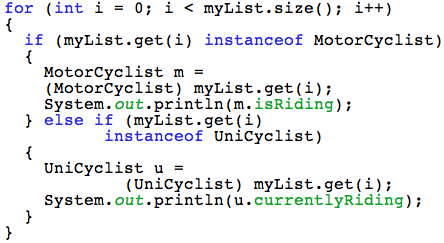
- To get objects from the list, just cast to the correct sub class
- See an example:
Poly example
Accessing the objects of the sub classes in the List by casting:
Abstract Classes
- A class from which an object can never be created
- All it's methods are abstract
- But it can have sub classes which must implement all methods
- And it can have fields that are not
static&final - It defines the generalized form that all its sub classes should take
- Sub class relationships must still be IS-A
Abstract Classes
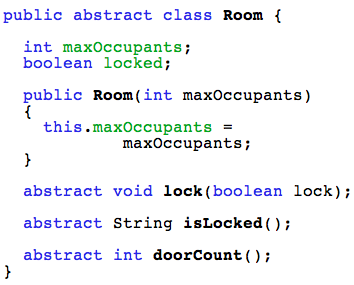
Note: Both the fields and methods of an abstract class are by default left public. This is so that any sub classes can access everything in the super class.
Room class
This is the abstract class:
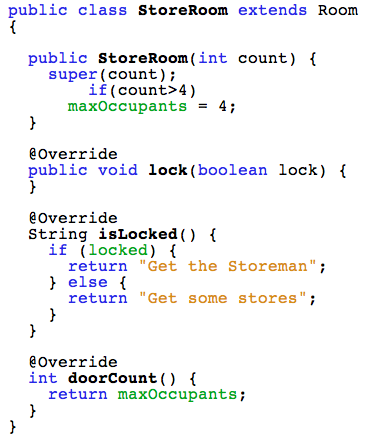
StoreRoom class
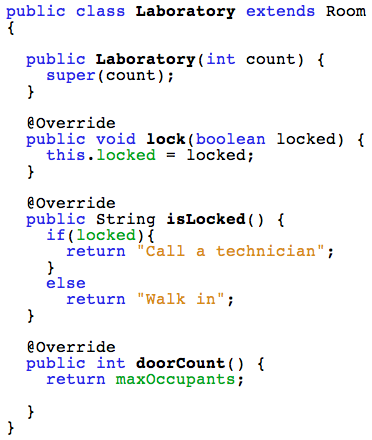
Laboratory class
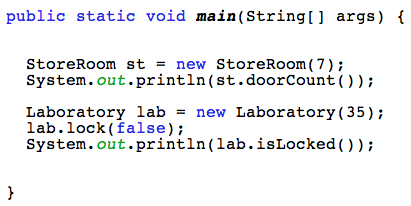
Main class
Just create objects of the sub classes and use them:
Abstract or Interface
Use an abstract class:
- When the situation calls for inheritance
- But the super class is too general for independent use
- only the sub classes have objects created from them
Use an interface:
- To give shared functionality to classes when these classes ca≥n't have an IS-A relationship with any super class
- To define the public face of a package of classes